Everything Stringtale adds to your workflow
Works inside your React or Next.js setup using one API route and your Git workflow.
Core features
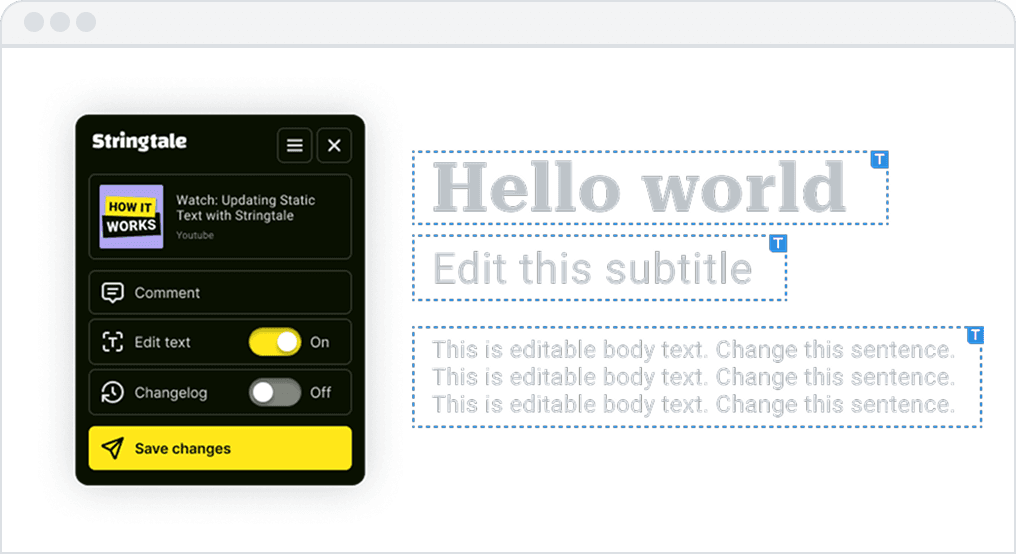
Editing layer (non-dev editing)
Non-devs fix copy without touching your code.
- Click any static text on real pages to edit
- No CMS, Git or syntax knowledge required
- Writers see exactly what they changed (before it reaches devs)
- True WYSIWYG: edits happen on the actual interface
Result: developers don't get interrupted for copy fixes.
Review workflow
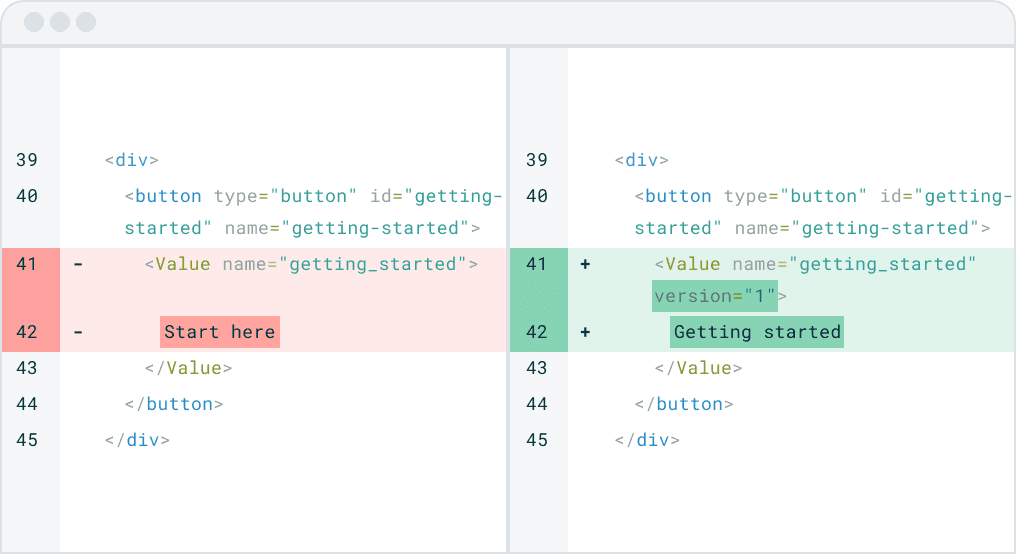
Developers get one clean, scoped PR.
- With the GitHub Action, pending text edits are bundled into a single PR
- Git diffs, like any normal code change
- No mixed files, no hidden surprises
- Review whenever it fits your release flow
Result: no context switching for tiny text updates.
Integration layer
Fits your stack without refactoring.
- Works inside React & Next.js projects
- One API route + one provider
- ESLint detects unwrapped static text
- CLI handles setup and migration in minutes
Result: add Stringtale without changing architecture.
npx @stringtale/cli initSafety & control
Your repo remains the source of truth.
- All edits end up in your Git history
- Writers can see previous versions of their own changes
- Developers keep full control through PR review
- No external content store or platform lock-in
Result: you stay fully in control of what ships.
How Stringtale works in practice
Static UI text lives in your code.
Editing it shouldn't interrupt developers.
Writer enables editing layer
Using the Chrome extension or ?stringtale in the URL
Writer edits text directly on the page
True WYSIWYG. No CMS, no Git
All changes are stored by Stringtale
Your API route auto forwards edits to Stringtale
Your CI pulls the changes into Git
Stringtale triggers your CI to sync edits into your repo
Developers receive one clean PR
Review and merge like any normal code change
Stringtale adds an editing layer for non-devs,
while developers keep their existing workflow unchanged.
Everything you need, included
No platform switching. No lock-in.

Chrome extension
Writers edit on live/staging pages

VS Code Plugin
Wrap missing strings as you type

ESLint Plugin
Catch missing wraps automatically

CLI
Setup & migration in minutes

GitHub Action
Automate text-update workflows

Slack Integration
Notify your team when edits are ready
Built-in onboarding for writers
Stringtale handles the rest.
What developers do
- Invite non-dev writers to Stringtale
- Select which URLs writers can edit on
- Keep reviewing PRs in the same way as before
We explain to writers that developers review changes on their own schedule, so there is no "is it live yet?" pressure on the team.
What non-dev writers get
- Onboarding that explains exactly how Stringtale works
- Editing layer that shows their text as it will appear in the PR
- Clear save states per field: live, edited, and saved (sent to developers)
- A changelog per field so writers see their own edit history
- A clean dashboard that lists all environments where they can use Stringtale
Result: writers can manage text updates independently, without pulling developers out of flow.
Pricing is intentionally simple:
no hidden conditions, no limits, everything included.
© 2026 De Monsters. Stringtale is a product by De Monsters